Use visual supports to increase understanding (Early Childhood)
teaching practiceFor student year
Helps students to
- learn new concepts
- follow lengthy instructions
- increase communication skills
Helps teachers to
- explain difficult concepts
- communicate effectively
Summary
For the primary school version of this practice, go to:
Use visual supports to increase understanding
We all use visual supports every day; for example, for remembering events with our calendar, knowing which direction to go using street signs, and knowing which buttons to use in our car when we want to use the windscreen wipers or lights. Because of differences in how language is processed and understood, some young children may need support in following and remembering verbal instructions, discussions, and information.
You can support learners to access and understand information by consistently supplementing oral communication (talking) with visual and/or written (for older learners) instructions and materials. Visual supports include pictures, such as stick-figure drawings, photographs and simple words, i.e., written materials.
Visual supports are useful for all learners, including neurodivergent learners, and:
- make abstract concepts concrete
- increase understanding
- can be used by all learners when they need a visual cue or prompt
How the practice works
Watch this video to learn more about how to use visual supports in your classroom.
Duration: 3:11
Australian Children’s Education and Care Quality Authority (ACECQA) National Quality Standards (NQS) related to this practice
Element 1.2.3: Child directed learning
Each child's agency is promoted, enabling them to make choices and decisions that influence events and their world
For further information, see ACEQA’s National Quality Standard page
Early Years Learning Framework (EYLF) outcomes related to this practice
Outcome 3: Children have a strong sense of wellbeing
Outcome 4: Children are confident and involved learners
Outcome 5: Children are effective communicators
For further information, see ACEQA’s Approved learning frameworks page
Preparing to teach
How does it help?
Some learners need the opportunity to see information to be able to interpret its meaning. Educators can capitalise on this strength by using visual (for younger learners) or simple written (for older learners) strategies and resources to support spoken instructions and explanations. Visual supports are both easy to use and often very effective.
When information is presented verbally, the words are only available to the recipient for a moment. Information presented visually, using symbols, pictures, or simple words, remains in place for as long as the learner needs it. This gives learners time to understand and refer back to the material as needed.
Types of visual and/or simple written materials that can be used include:
- daily schedules or timetables
- checklists of activities to complete
- sequence of activities or steps in an activity
- first and then charts
Assessing and/or consulting with parent/carers and specialists about the learner’s comprehension skills will help you to determine which information should be presented visually for the learner (e.g. daily schedule with all activities presented or a simple ‘first and then’ chart with just two images.
Use this information to help you to select the best forms of representation: objects, photographs, drawings or words/written material or a combination of these formats.
It works better if visual supports are…
- developmentally appropriate
- are engaging and fun for children to use
- kept simple
- used in times of transition, change, stress, and anxiety
- used consistently so individuals attach meaning to them
- move with the learner across settings, e.g., to home and other places the child lives, learns and plays.
- offered to all learners
It doesn’t work if visual supports are…
- not appropriate to the capacities of the learner or unnecessarily complex
- only used with learners on the spectrum
In the classroom
How do I do it?
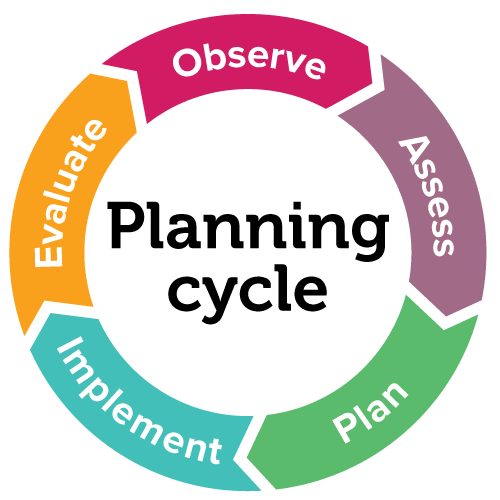
Use the EYLF Planning Cycle to integrate visual supports into the program
- Observe: the children’s strengths, interests and areas of support needs (e.g. transitions, choosing activities) where visual supports might help
- Assess: ask parents/carers and specialists about how they are using visual supports and what works well
- Plan: how to introduce visual supports to the program for all children and how you will teach the children to use them
- Implement: your plan by intentionally teaching children how to use visual supports throughout daily activities and routines and develop individualised goals with the child’s parent/carer and others that are involved in supporting the child’s learning and development (e.g. speech pathologist)
- Evaluate: the impact on the child’s learning, behaviour and comprehension and whether the visual supports are meeting the individualised goals for the child
How will I know if it’s working?
- Children display increased independence and improved comprehension
- Children have decreased anxiety, stress and/or frustration
- Children proactively use visual supports when and how they need them with peers and adults
- Transitions are smoother with learners adapting to change more readily
- Educators have the knowledge, skills and confidence to introduce and teach the use of new visual supports as they are needed
- Educators, parents/carers and specialists communicate about the child’s use of visual supports and plan strategies together
Practice toolkit
Practice implementation planner template
We know it's not always easy to keep track of what's working and what isn't. So, we've created this template for you to record and reflect on what you're doing to create more inclusive classrooms. The implementation planner contains:
- guidance around goal setting
- a reflection section (what worked, didn’t work, what to change, and next steps)
- prompting questions.
Implementation planner with examples
 Download
 Set your professional learning goal for:
Use visual supports to increase understanding (Early Childhood)
Benefits of goal setting
Setting, working towards, and reflecting on goals helps you grow professionally and improve your practice. You can access AITSL learning resources for teachers to learn more about:How to set goals
The Australian Institute for Teaching and School Leadership recommends using the SMART matrix to frame your goal setting.SMART goals refers to goals that are:
- Specific
- Measurable
- Achievable
- Relevant
- Time-phased
Resources
Related Practices

Embed opportunities for choice making (Early Childhood)
TEACHING PRACTICE
For student years
Helps students to
- make decisions
- build independence
Use visual schedules
TEACHING PRACTICE
For student years
Helps students to
- transition smoothly
- understand expectations
- learn new concepts
Learning Cycle